
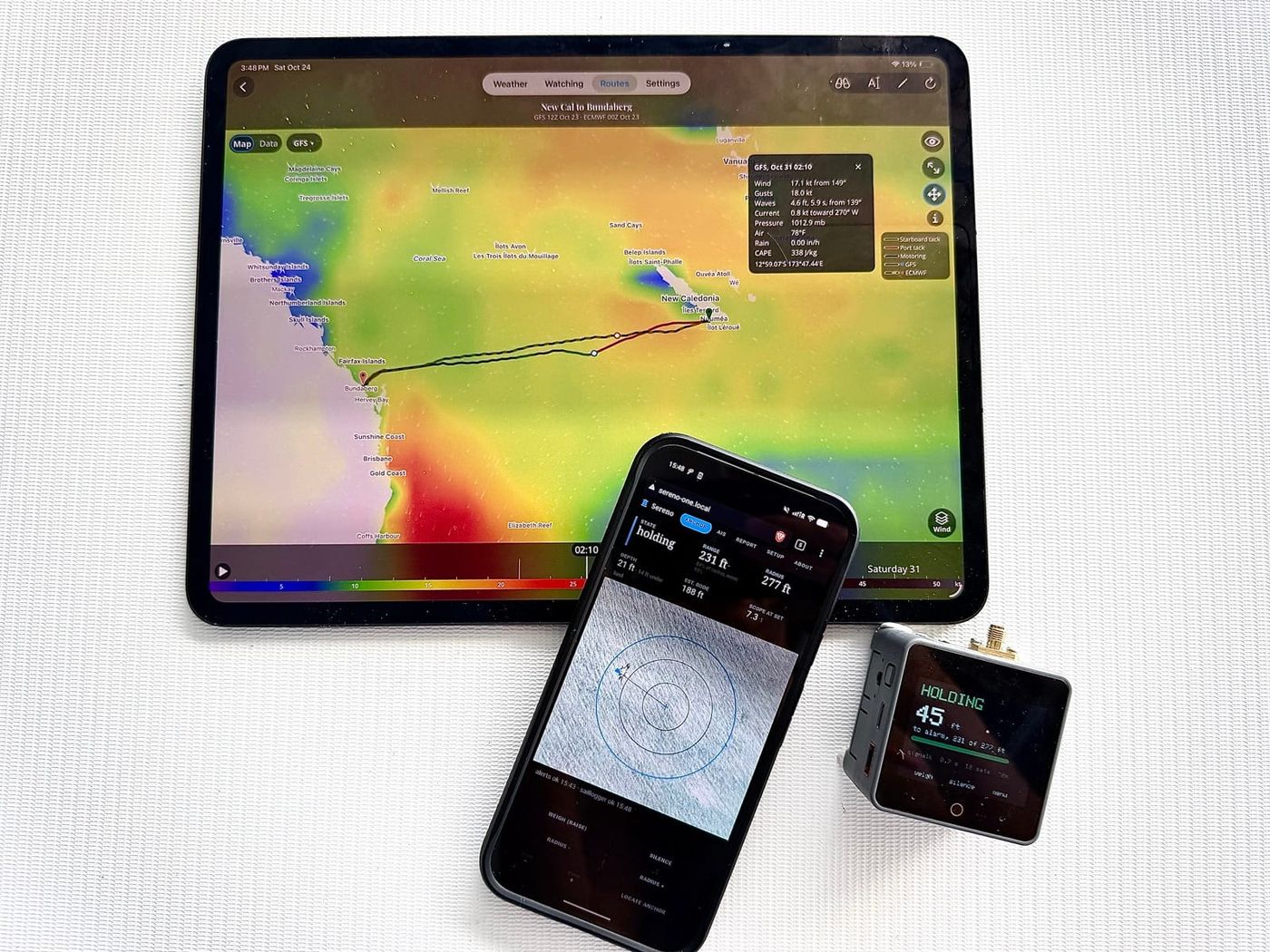
Sereno Solutions is a suite of software applications and hardware we designed for us to use while we sail around the world. We are currently using these daily for our own anchorages and passages. Two parts of it are ready to describe: Sereno Routing, a weather router for planning passages, and Sereno One, an anchor watch and an AIS collision advisor in a single unit. Both are in active development but have been in use by many sailors beginning in 2026.
Sereno Routing
Sereno Routing plans sailing passages on forecast weather and gives guidance on the best departure days. We believe that the routing engine we are using is one of the best available. It uses your polars and passage criteria to route around land, reefs and shallows and within your boat's wind and wave limits, then provides you with a very detailed passage summary.
What sets it apart
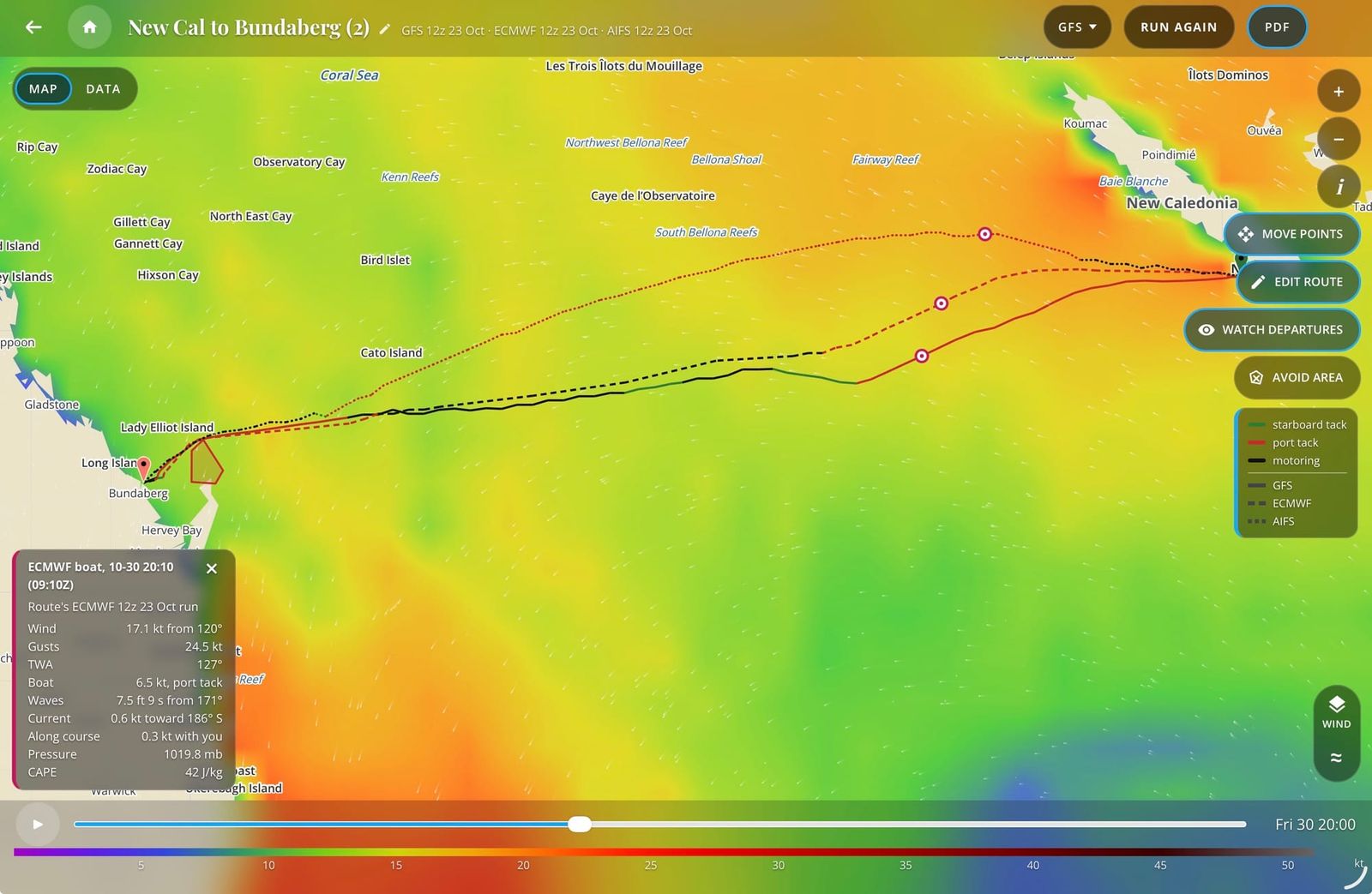
Check the forecast against what the satellites measured
The ASCAT layer shows wind that the Metop-B and Metop-C satellites measured over the last 12, 24 or 48 hours, colored like the wind map. A comparison view shows where a model's forecast is stronger or weaker than the measurement, and with the layer on, a tap on the map puts the nearest measurement beside the forecast.
Each spot is crossed about twice a day, and a pass shows up one to three hours after the satellite goes over. It's for checking the forecast and doesn't change a route.
See what stations and ships are reporting
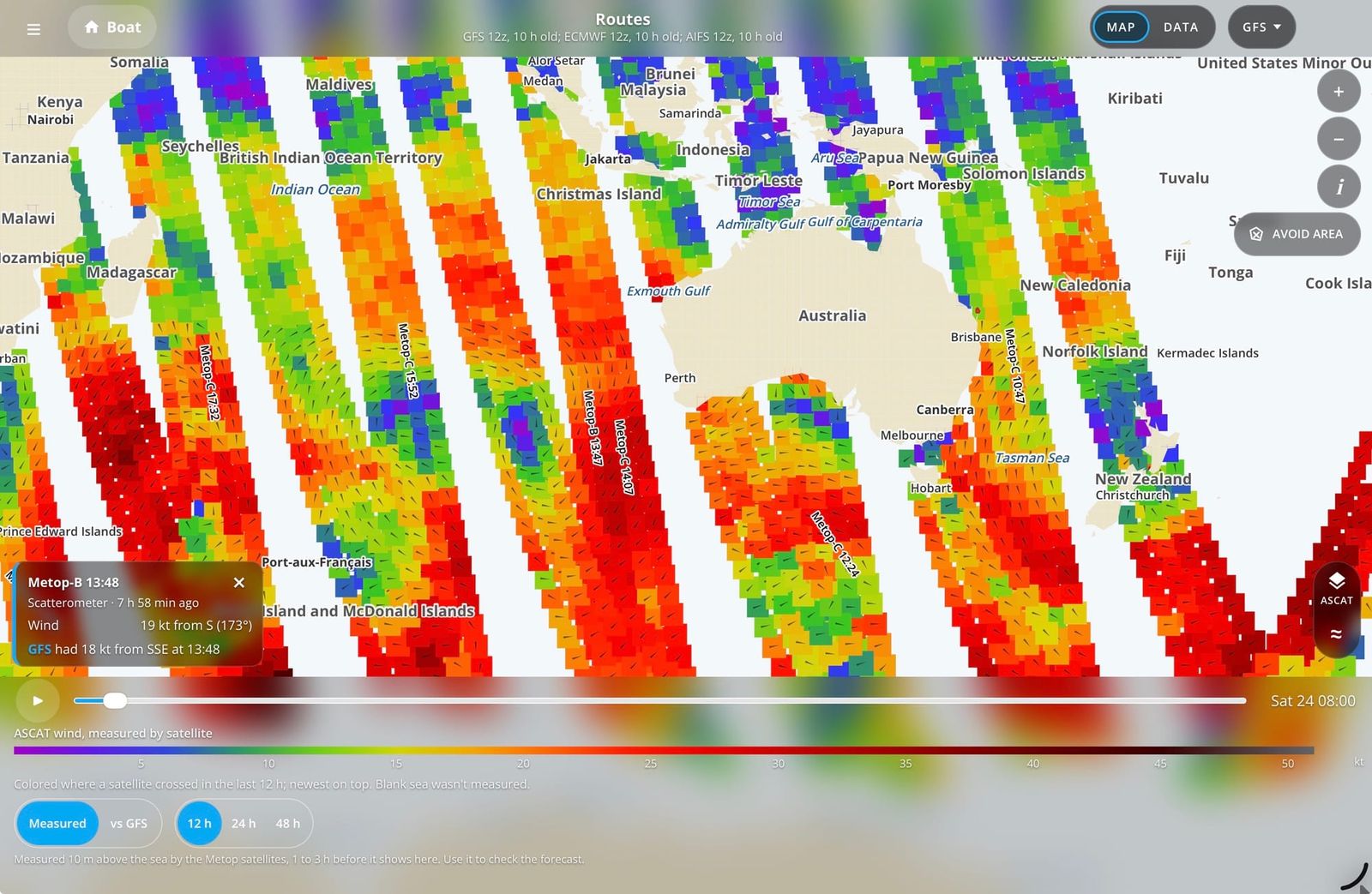
Airport, buoy, coastal-station and ship reports from the last few hours show as points on the map. Tap one and the model's forecast for the same place and time appears beside it.
Coverage thins offshore, and a report can be up to three hours old.
One account on the web and your phones
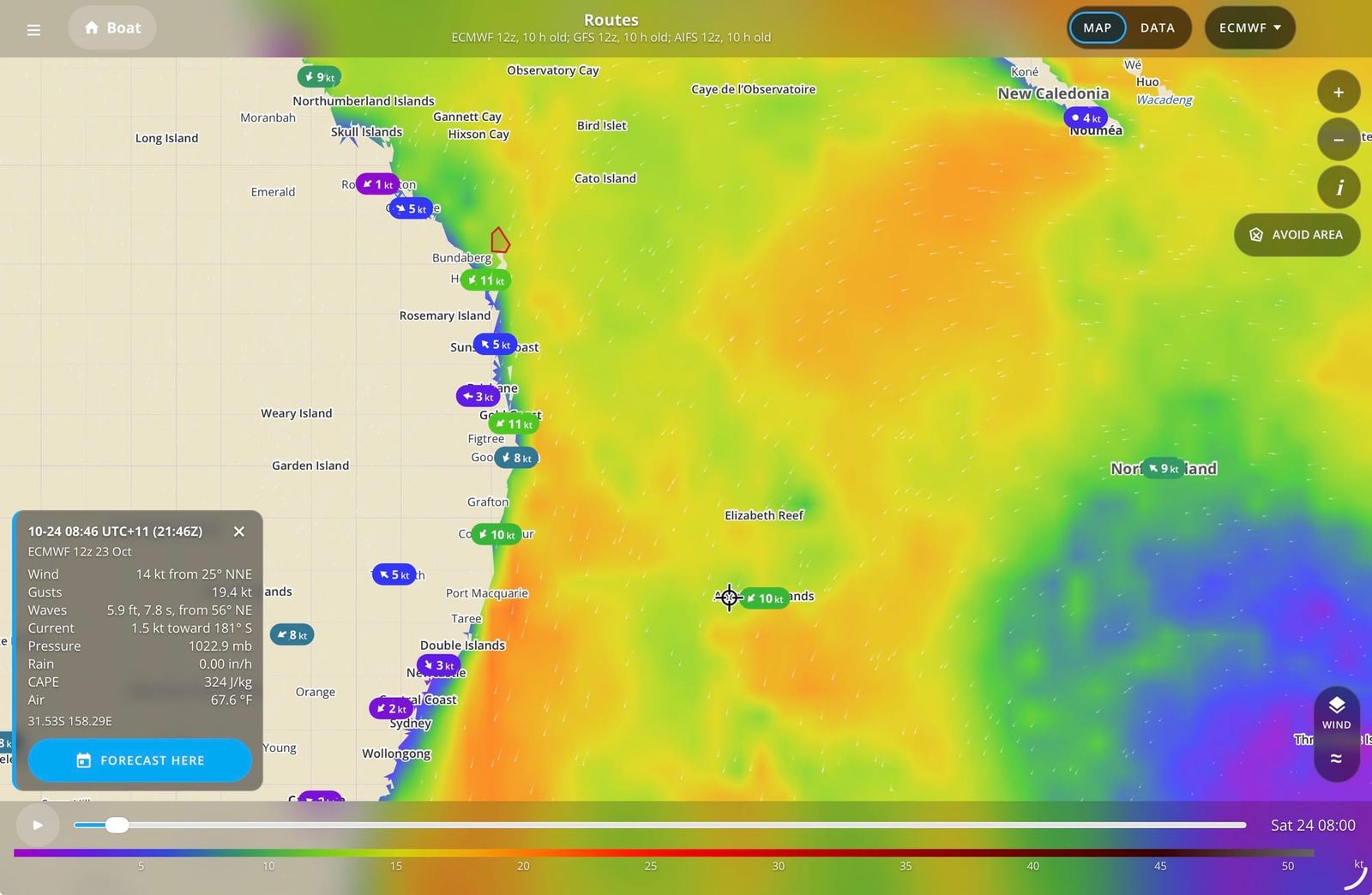
Your boat, polar, limits, units, saved routes, avoid areas and watched trips follow your svsabado.com membership between the web, Android and iPhone. Pick up whichever device you have and your data is there. Your trips are saved until you delete them.
Theme, map layers and table columns stay on each device.
Decide when to leave, then let it keep watching
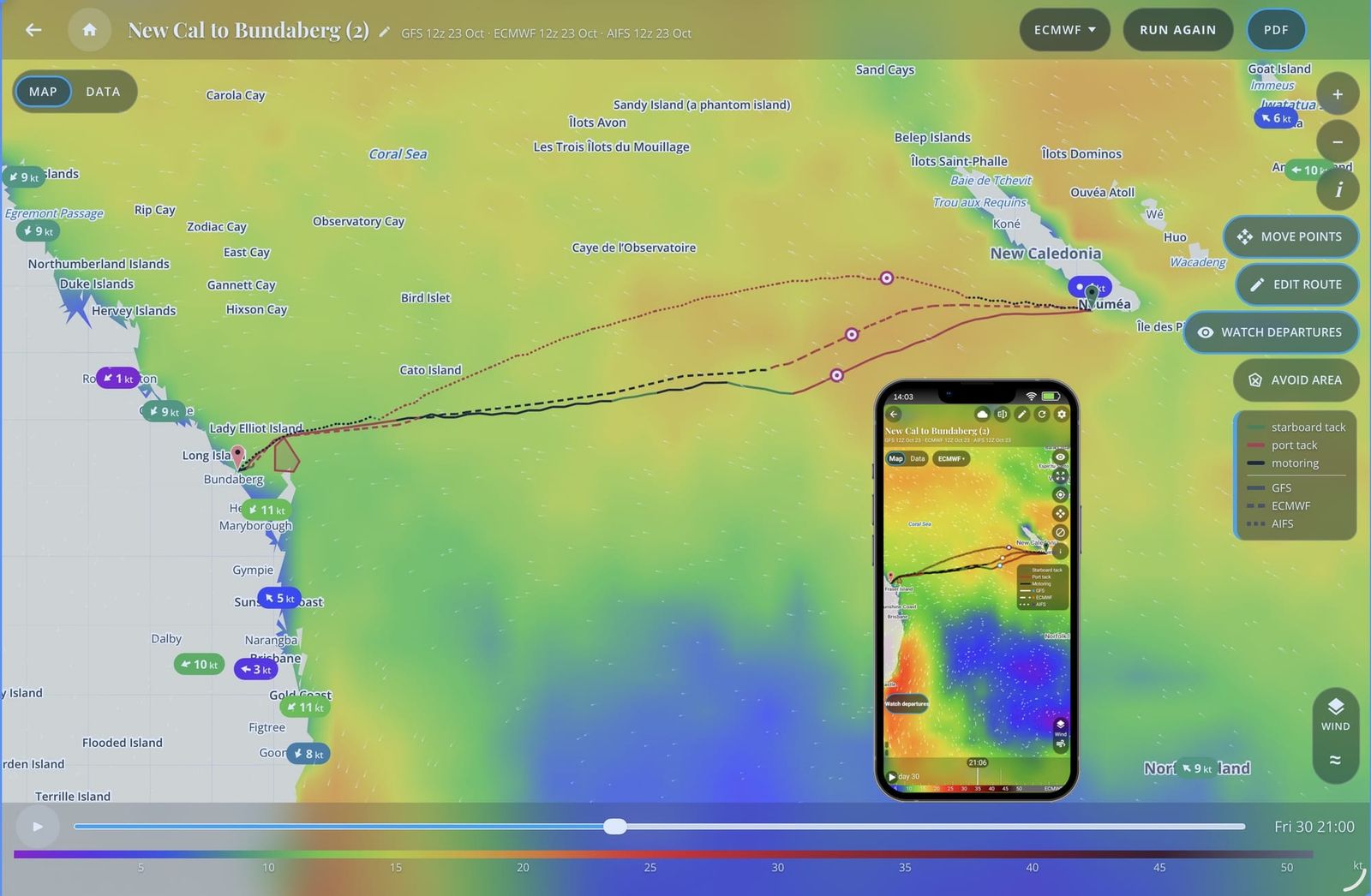
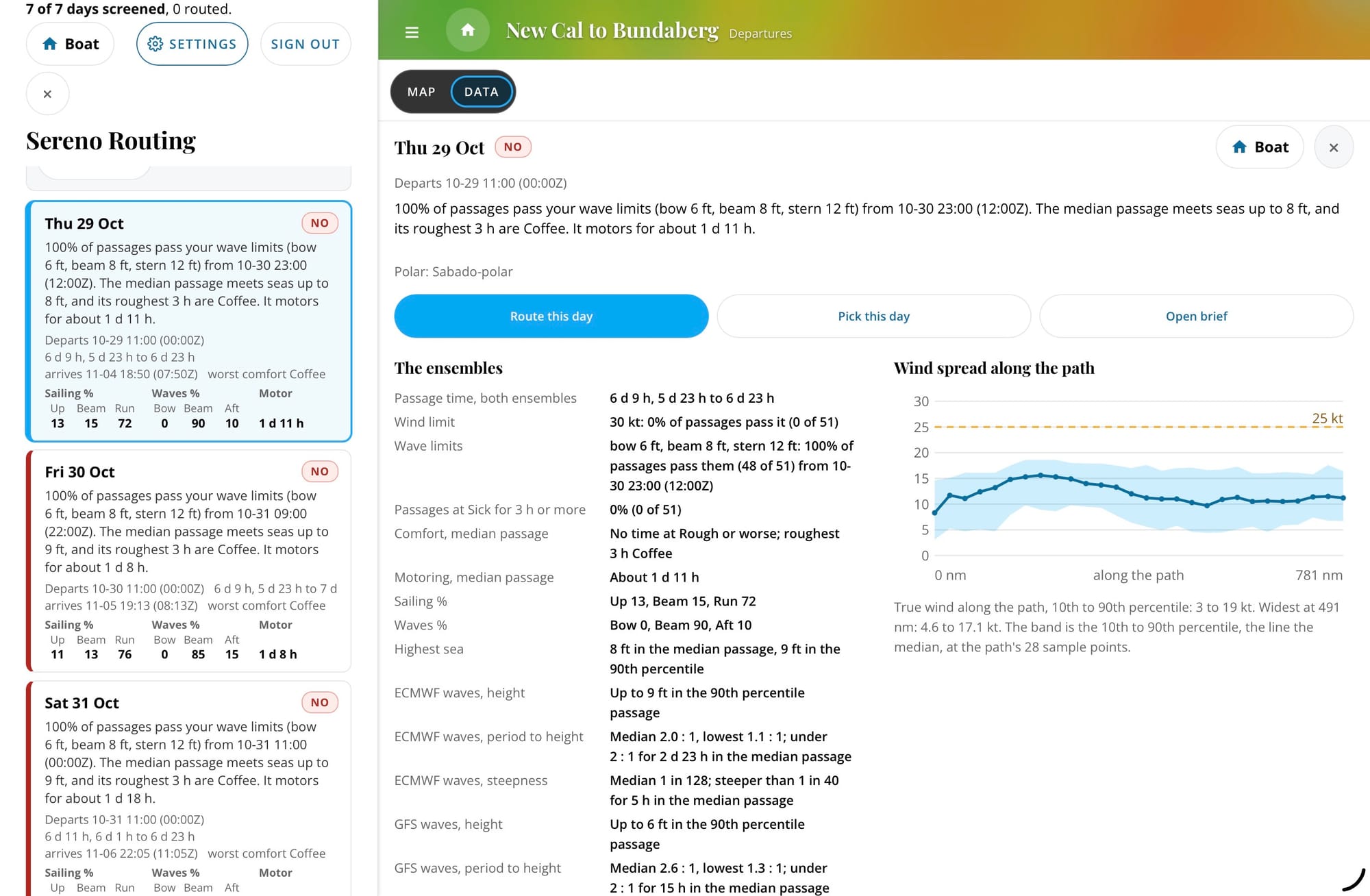
Screen up to ten departure days on the ECMWF and GFS ensembles. Each day gets a Go, Warning or No with the reason in plain words, and a watched day alerts your phone when its verdict changes. A finished route can start a trip with Watch departures. This is not AI derived guidance.
Routes that avoid the hazards
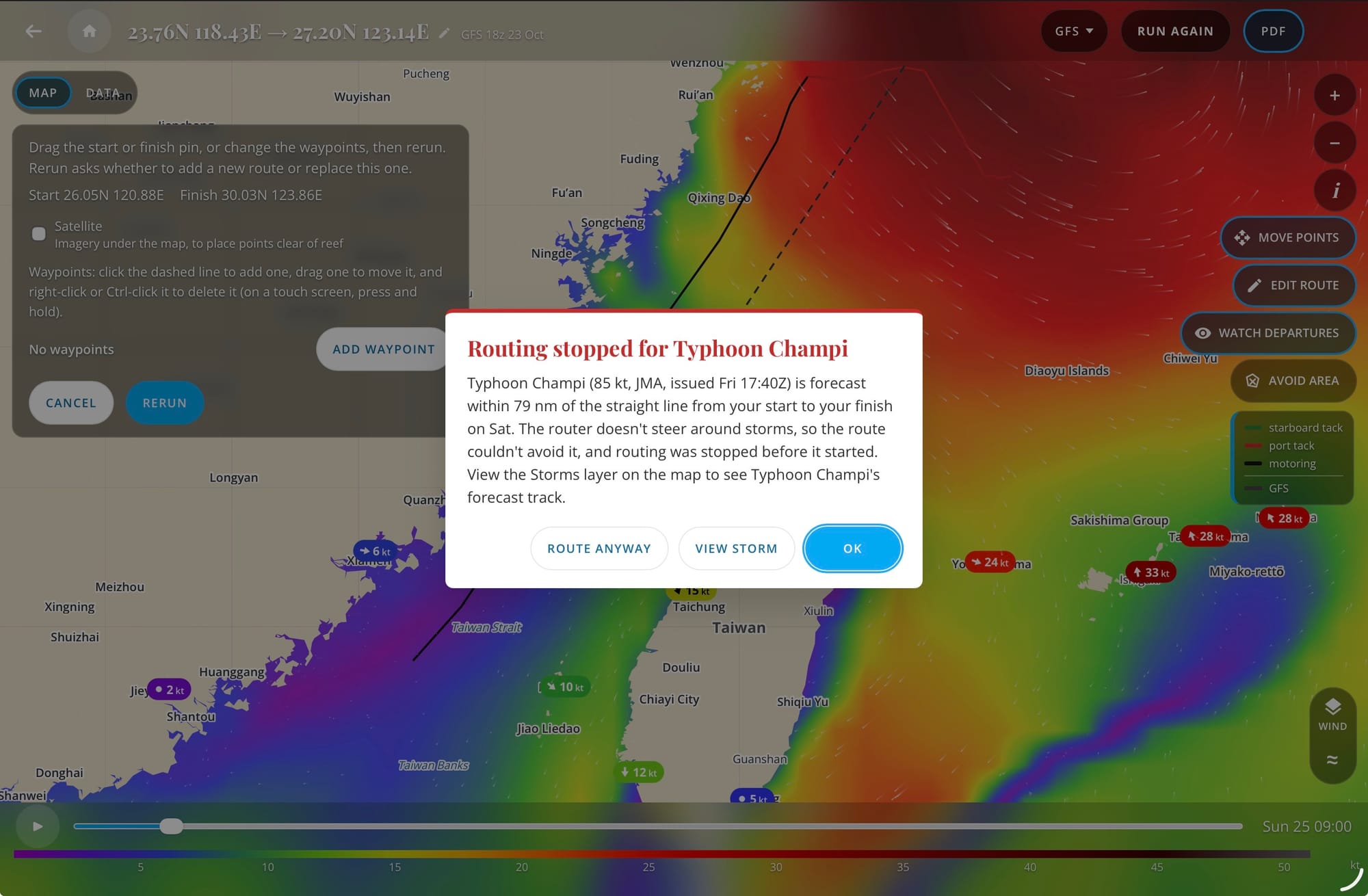
Routes keep off land, charted reefs and water shallower than your boat's minimum depth. Before a route runs, it checks for official named storms forecast or upper air disturbance indicators near the route. When a route can't be made, the message names the cause and what to try: a waypoint, another departure, a finish outside the pass, or a limit eased.
Dense reef can defeat any router. Sereno Routing is for planning a passage, not for navigating.
It runs in a browser, in an Android app and in an iPhone app, on one account, and the web edition links to both apps. The iPhone app is a TestFlight beta and isn't on the App Store yet. Your routes are kept until you delete them so you can go back, edit them, rerun on new data, or duplicate them for side by side comparisons.
Weather and maps
| Three forecast models | GFS, ECMWF and AIFS (ECMWF's AI model), refreshed as new runs arrive. Every screen shows which run you're looking at and how old it is. |
|---|---|
| Weather map | Wind and gusts, pressure, rain, waves, CAPE, ocean current, infrared cloud, disturbances and official storms, with a time slider to the end of the run and satellite imagery underneath. On a route, choose which model's weather the map shows. |
| Weather forecasts | Tap anywhere for the forecast at that spot, hour by hour and day by day: ten days of it, with rain chance from each ensemble, sunrise, sunset, the moon and tides. |
| Storm signs | Active tropical cyclones from NHC, JMA, JTWC and Nadi show on the map and are noted on routes they touch. Outlines of strong low-level spin are flagged too, and we're still checking that rule against real storms. These notes never fail a route, they inform the user and allow them to decide. |
Measured weather and more layers
| ASCAT wind | Wind that the Metop-B and Metop-C satellites measured over the last 12, 24 or 48 hours, with a view of where each model's forecast is stronger or weaker. Each spot is crossed about twice a day, and a pass appears one to three hours later. With the layer on, a tap anywhere on the map adds the nearest measurement and what the model on the map had there. Cells are blank in rain, readings are weak near the coast, and light-wind directions are uncertain. It checks the forecast and doesn't change a route. |
|---|---|
| Observed wind | Airport, buoy, coastal-station and ship reports from the last three hours, with the model's forecast for the same place and time beside each. Coverage is thin far offshore. |
| Cloud | Infrared cloud imagery under the weather map. |
| Arrival | The destination's weather on the arrival day, on its own tab. |
| Times | Local (your device's zone), UTC, or At the boat: each time on a route in the zone the boat is in then, with a row where the clocks change. A route keeps the choice it was made under, and a forecast at a point reads in that place's zone. |
| Bulletins | Official high seas bulletins in the route PDF, where the issuing service allows a copy. |
| Slow links | Map layers arrive in small packed pieces. A first window measured about 0.10 MB, against 1.03 MB before the change (2026-10-04). A 1,000 nm route on three models measured about 40 KB from the server to the device (2026-10-22). It's built for slow, metered links. |
What follows you between devices
| Follows your membership | Your boat (hull, length, polar, day and night percentages, motor speeds, fuel use, sailing angles, depth, the wind limit and the wave limits by side), units and times, uploaded polars, avoid areas, saved routes, and planner trips and watches. |
|---|---|
| Stays on each device | Theme, map layer choices, satellite, the Observed and ASCAT settings, table columns and map position. |
Routing
| Routes on all three models | One request routes on GFS, ECMWF and AIFS side by side, so you can see where they agree and where they don't. |
|---|---|
| Your boat's polar | Pick from a library of 187 polars, upload your own .pol file, or edit one in 5 degree steps. Day and night percentages can be set to match your sailing style. |
| Sailing angles and limits | Your closest angle to the wind and deepest downwind angle, plus the maximum wind and the highest seas for the bow, the beam and the stern, judged at the angle the seas meet the boat. A route that can't stay inside them says where and when it would exceed them. When a wave limit stops a route, the message says so and offers to run it again without wave limits. |
| Motoring | Enter your boat's speed under engine in a calm, and at 25 and 35 kt of wind by angle. With Prefer sailing on, the default, the engine runs only where it's at least 30% faster than sailing. Motor below sets a sailing speed under which the boat motors. Any route can be sail only. |
| Land, reefs and shallows | Routes go around coastlines, charted reefs and water shallower than your minimum depth. |
| Storm check | Before a route runs, it checks the official forecasts from NHC, JMA, JTWC and Nadi for a named storm near the straight line from start to finish. If one is close, the route stops before it starts and names the storm, with OK, View storm and Route anyway. The router doesn't steer around storms as we've found this to result in unrealistic routes. |
| Ocean current | Surface current is part of every route unless you turn off Use ocean current in Settings, and the table shows its set and drift along the way. |
| Waypoints and areas to avoid | Add waypoints to route through a pass or round a cape: tap them onto the map and drag them, or type positions into the waypoint table. Draw no-go areas on the web map and every route keeps out of them. The phones show them on the map and list them. |
| Long passages | Passages up to about 3,000 nm. Past the end of the forecast, the rest of the way is an estimate, drawn dashed and labeled and is based on climatology data. |
| Time limit | Most routes are completed within a minute and a half, with longer routes such as ocean crossings potentially taking twice that or more. |
| When a route fails | It names the cause, where it happened, and what to try: a waypoint, another departure, a finish outside the pass. A route that circles or zigzags is flagged with where and when. |
| Run again, Move points, Edit | Rerun a route on newer weather, with its points moved, or with its settings changed, then keep it as a new route or replace the old one. Any route can be renamed, and an unnamed one is listed by its start and finish. |
Results and planning
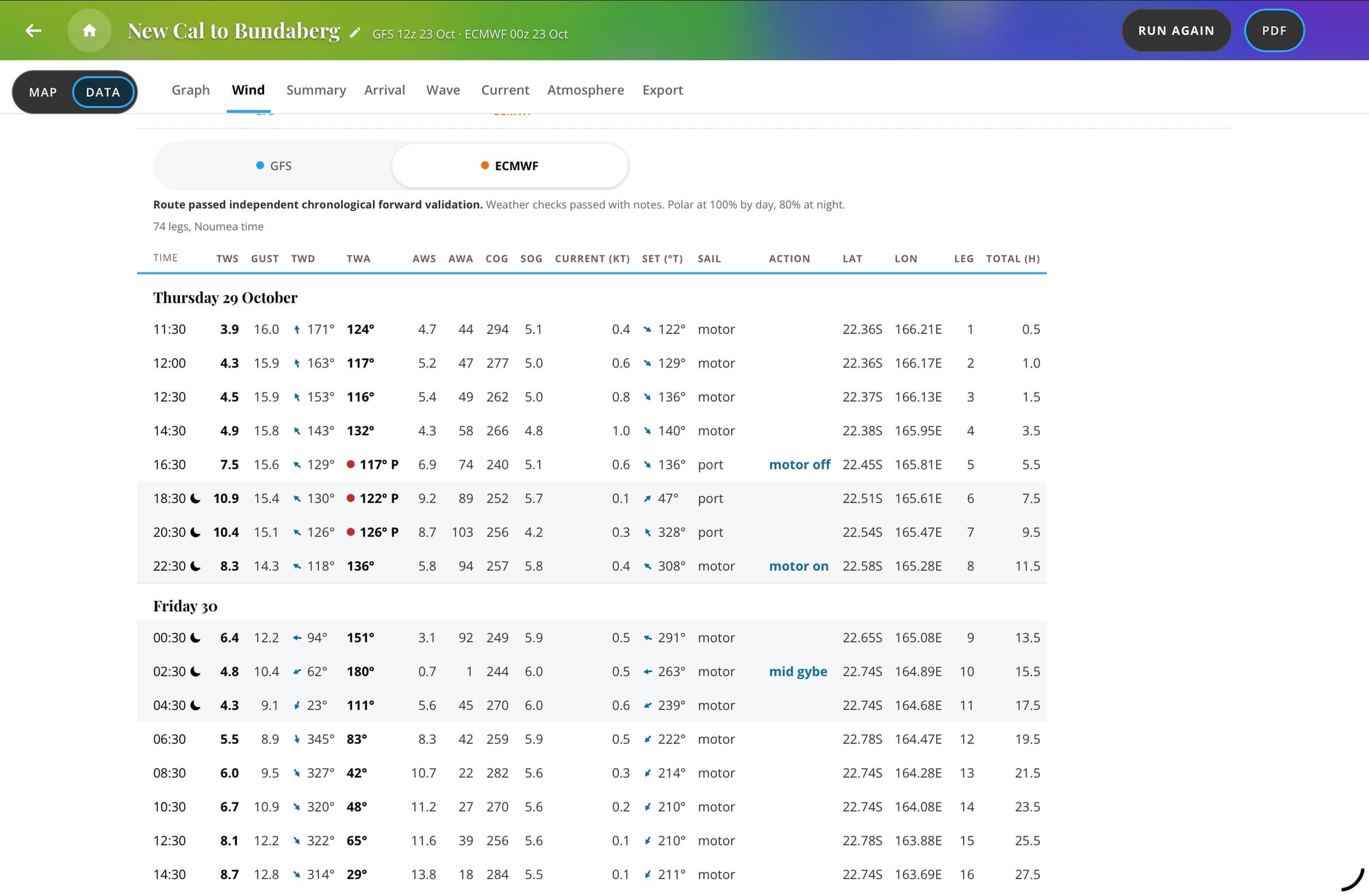
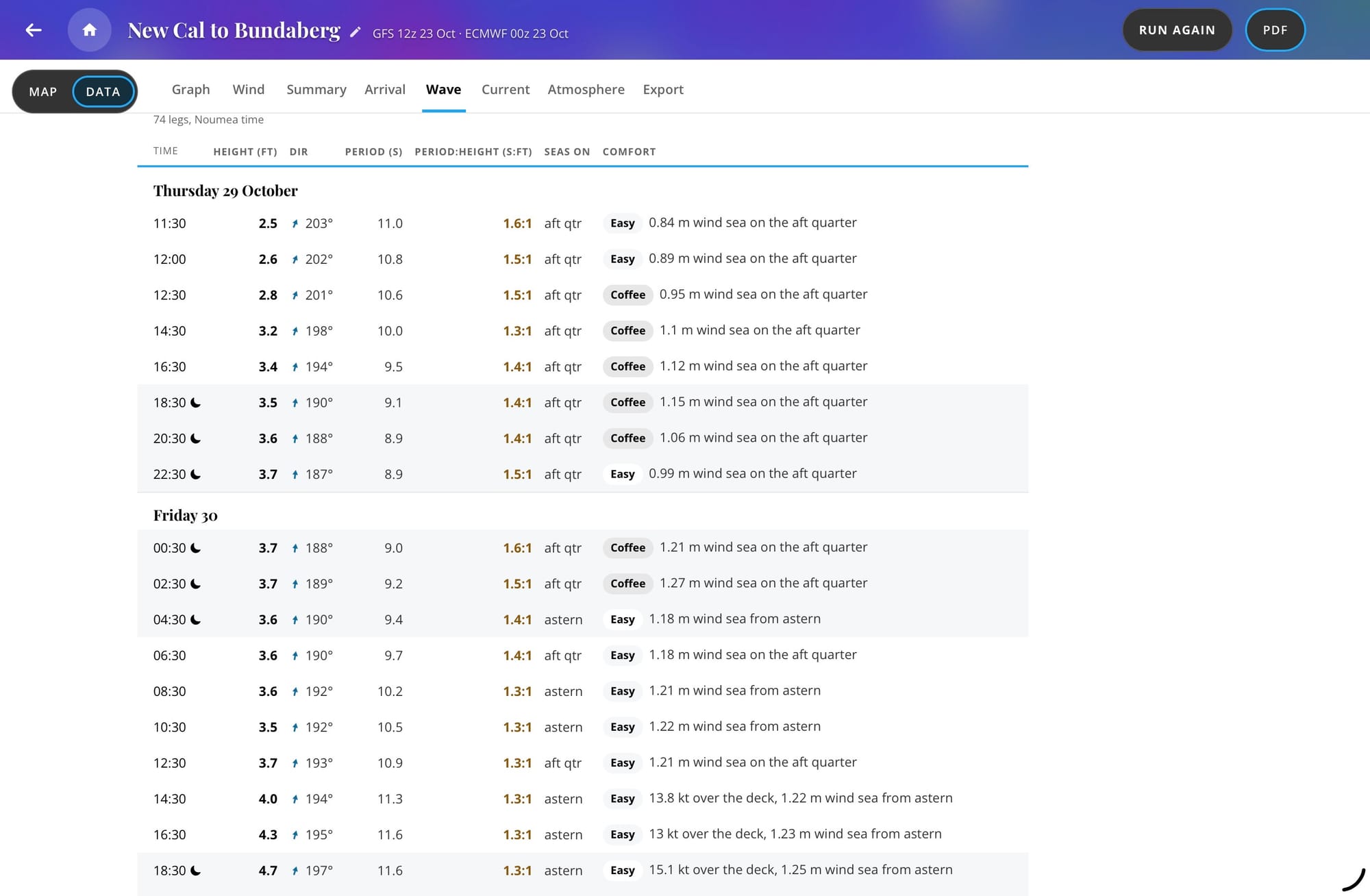
| Route table | Every leg with time, position, course and speed, true and apparent wind, gusts, sail plan or motor, waves, current, rain and comfort. |
|---|---|
| Comfort | Each leg is rated Champagne, Easy, Coffee, Rough or Sick for your hull type and length, with the reason given. |
| Sea state | Wind sea and swell shown apart, the period to height ratio, and the side of the boat the seas arrive on. |
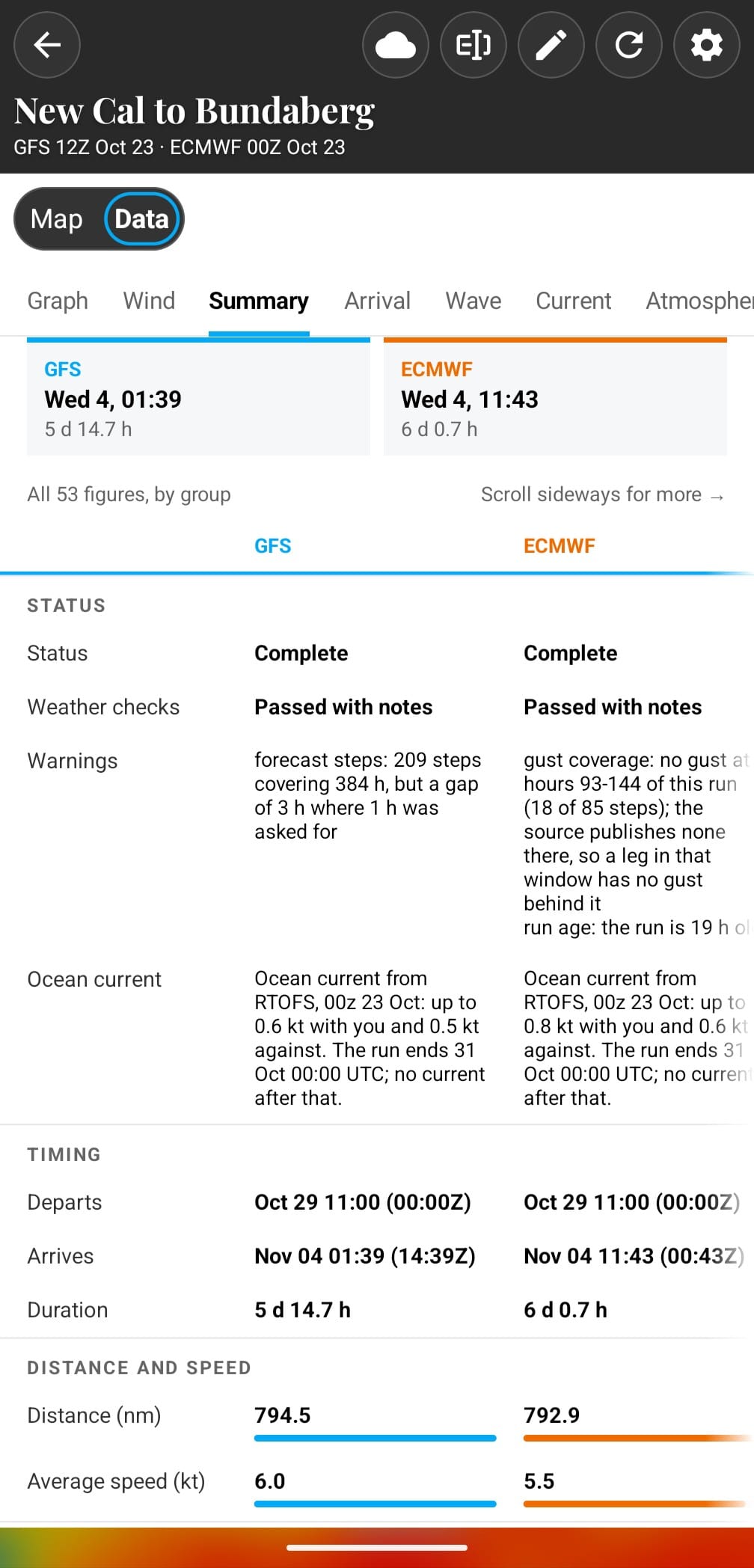
| Summary, graphs and fuel | Arrival, distance, time under sail and motor, tacks and gybes, strongest wind and highest sea for each model, charted along the passage. Enter your engine's fuel use and reports show what the route burns. |
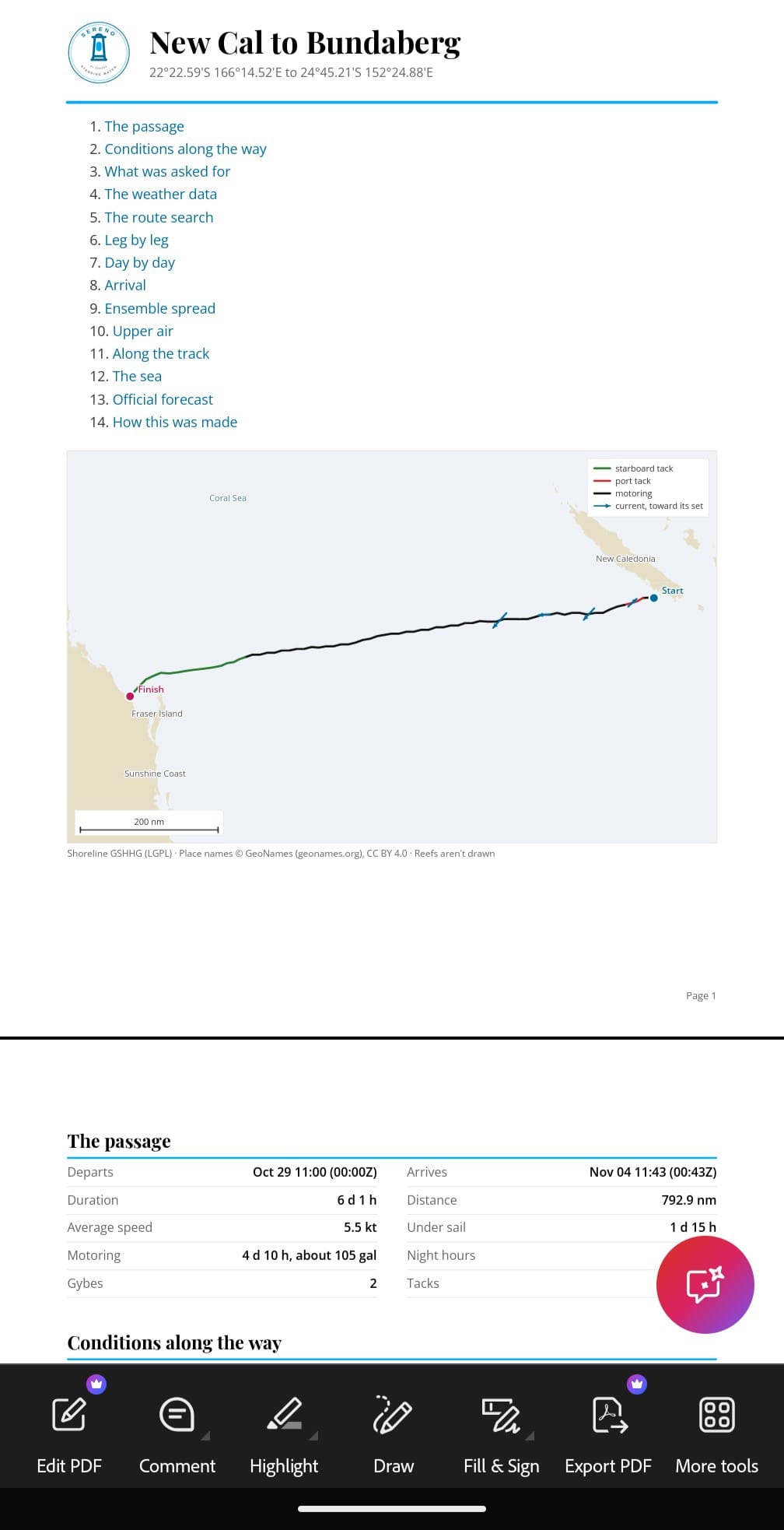
| Exports | A PDF report with the day-by-day conditions, a GPX file for your chartplotter, and the route table as CSV with each point's latitude and longitude, each file named for the route and the model. On Android and iPhone, Send to B&G puts the GPX on a B&G plotter's memory card over the boat's WiFi. We've tested it on the B&G Zeus line of plotters. |
| Departure planning | Screen up to ten departure days at once. Each day is sailed by every member of the ECMWF and GFS ensembles on your boat's polar, then given a Go, Warning or No with the reason in plain words. |
| Watching | Watch a trip or one departure day. It's screened again automatically as each new ensemble run arrives, and the phone apps alert you when a watched day's verdict changes. Watch departures on a finished route starts a trip from it, keeping the route's own boat settings. |
| Passage brief | The weather for the passage day by day, the official forecast, the sea, and how far the ensembles spread along your track. Every sentence comes from fixed rules on computed numbers not AI, so the same weather gives the same words. |
What to expect in beta
- Routes are for deciding when and which way to go. This is not for navigation.
- Some passages, such as dense reef in parts of Fiji, defeat every router. When that happens, the message says why.
- Each release is listed under Changes on the Boat page at https://sereno.svsabado.com/boat/.
- If a route looks wrong, use Report this route on the web edition. The privacy page at https://sereno.svsabado.com/privacy/ says what a report contains.
Coming to Sereno Routing
These are planned, some already in progress, and some currently in testing. We'll move each one up into the lists above when it ships. Flagship members have the option of testing these Alpha features early.
| Speed or Comfort | A choice before a route runs: the fastest route, as now, or one that gives up a little time for easier seas, shown against the fastest. |
|---|---|
| More models | More forecast models to route on, starting with ICON, then GEM. |
| Faster routing | Routes that take less time to work out, and a weather map on the phones that loads faster as you pan and zoom. This is part code optimization and part hardware upgrades. |
| Wind near land | Near land, the model's wind reshaped to the terrain at about 1 km, so headlands, gaps between islands and the lee of high islands show in the route. |
| Finer reefs | Reef shapes and shallow-water depth from the Allen Coral Atlas, so lagoon passes and reef edges are judged at meters rather than hundreds of meters. |
| On passage | Mark the route you're sailing. Sereno shows if the boat is ahead or behind the plan, and Reroute from here runs it again from your position on the newest forecasts. |
| Passage history | On passage, what the boat measured beside what each model forecast for the same time and place, with a running score for each model. |
| Passes and entrances | Notes on the swell at passes and entrances (its energy, period and direction just offshore, against the tide), and flags where a building wind sea crosses a heavy swell or waves run against a strong current. |
| Polar check | Your polar compared with how the boat sailed, from its track and a Sereno One's recordings, with changed cells offered for you to accept. |
| Send us your polar | Send your polar in whatever form you have it, such as a PDF, an image, a scan or a spreadsheet. We convert it by hand and, if you agree, add it to the library. |
| Safety report at the finish | Tsunami bulletins, nearby earthquakes, GDACS alerts, the marine forecast and advisories for the route's finish and the boat's position. |
| Avoid areas on the phones | Draw, edit and remove no-go areas on Android and iPhone, as on the web. |
| Low data mode | A switch that stops the weather map loading as you pan and zoom until you ask for it, with a count of the data the app has used. |
| Routing over an Iridium GO! | A satellite mode for the slowest links: one request out and a compact route back, sized for the original Iridium GO! at 2.4 kbps. |
| What's New on the phones | A short note of what changed, the first time a new build of the app opens. |
| Notices | Messages from us in the apps and on the web, such as planned maintenance. |
| iPhone on the App Store | The iPhone app moves from TestFlight to the App Store, once Apple has reviewed it. |
Sereno One
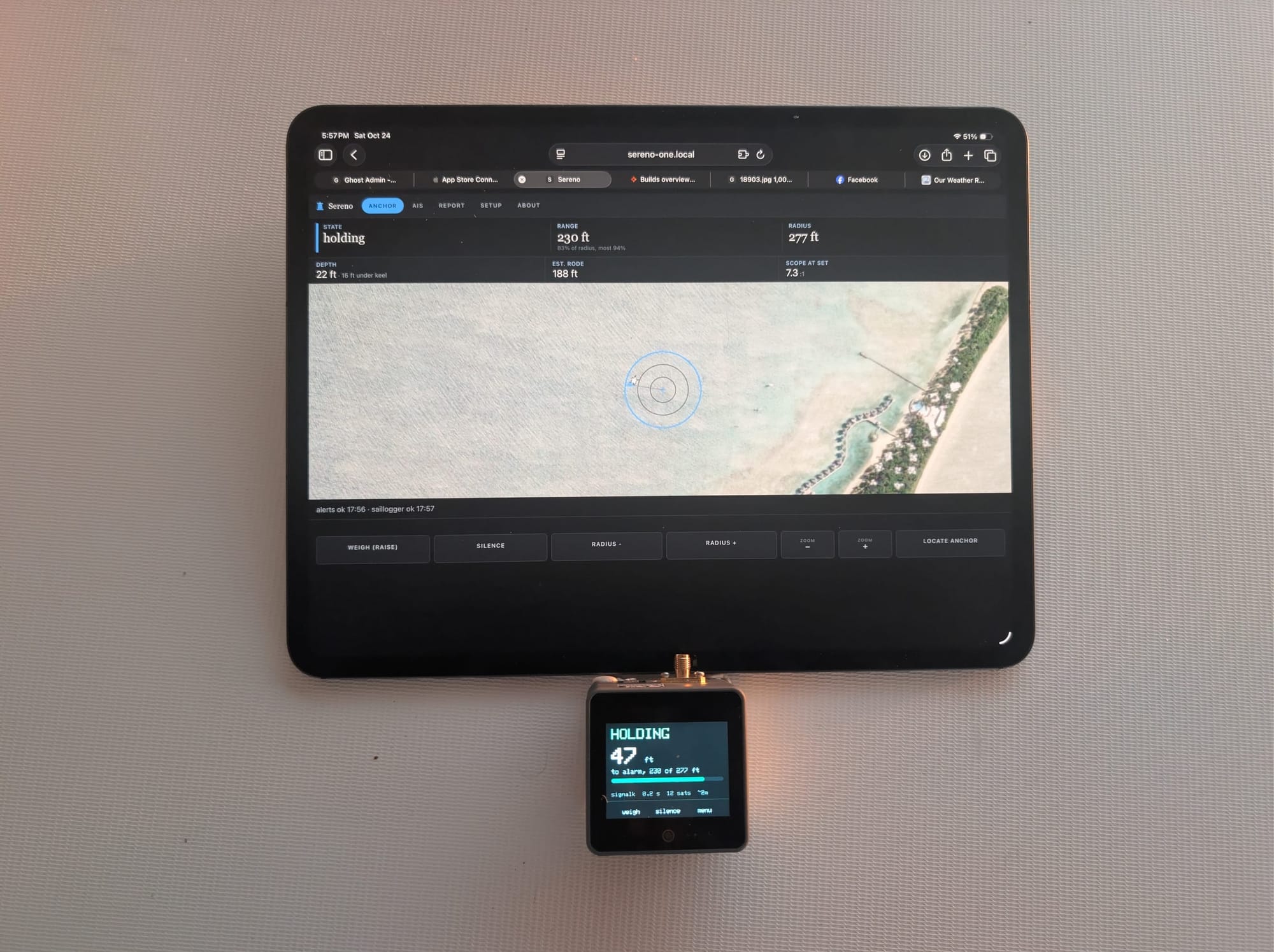
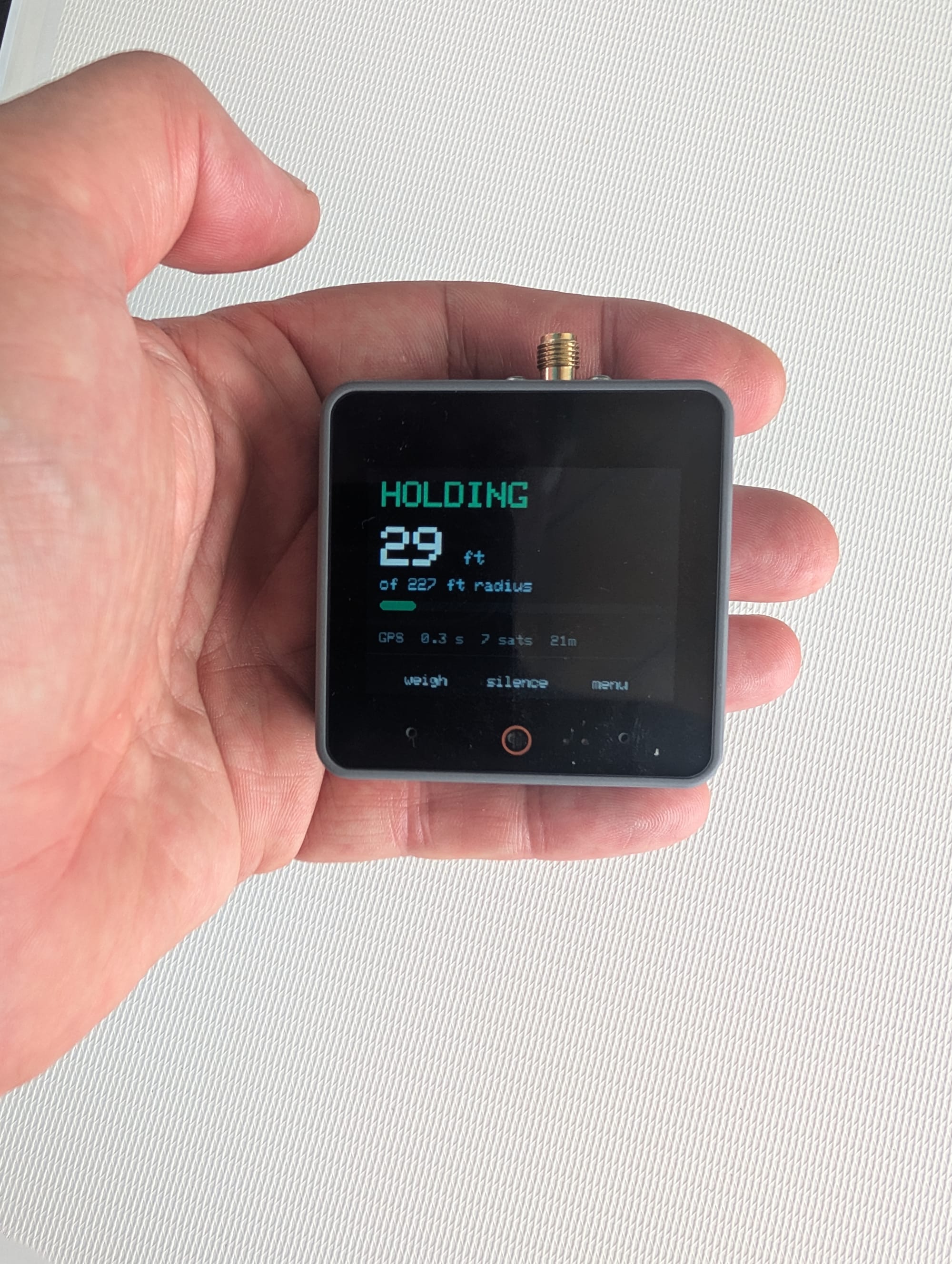
Sereno One is our anchor watch hardware solution. It has its own GPS, a touch screen, a speaker, an internal battery, and it runs from the boat's 12 volts or a USB-C charger. Put the antenna where it can see sky, tell it when the anchor is down, and it keeps watch with nothing else on the boat switched on. If the boat leaves the circle you set, it sounds the alarm, and when the boat has internet it sends alerts to your phone through Pushover, wherever you are.
What it does
A stand alone anchor watch
Its own GPS, screen and speaker means it keeps watch with nothing else on the boat switched on. Alarms for warnings, dragging, power loss, and gps fix quality issues.
The built in speaker alarms and it sends alerts to your phone.
Alerts that keep trying
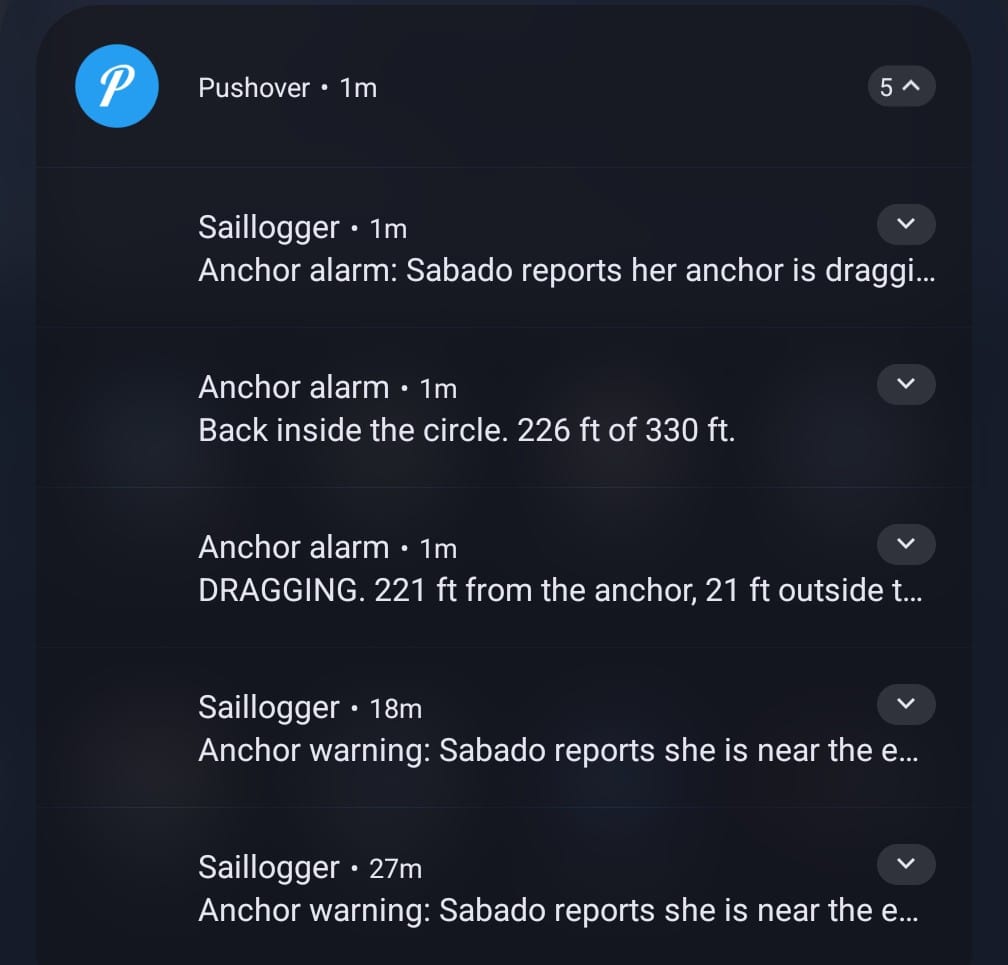
A drag, distress or lost-position alert goes to your phone at emergency priority. It repeats every minute for up to an hour until you acknowledge it, and it retries for up to eight hours if the boat's internet is down.
Needs Pushover on your phone and internet on the boat. Set your phone to let the alert through Do Not Disturb. Also gets alerts through Saillogger
Record the passage, build your polar
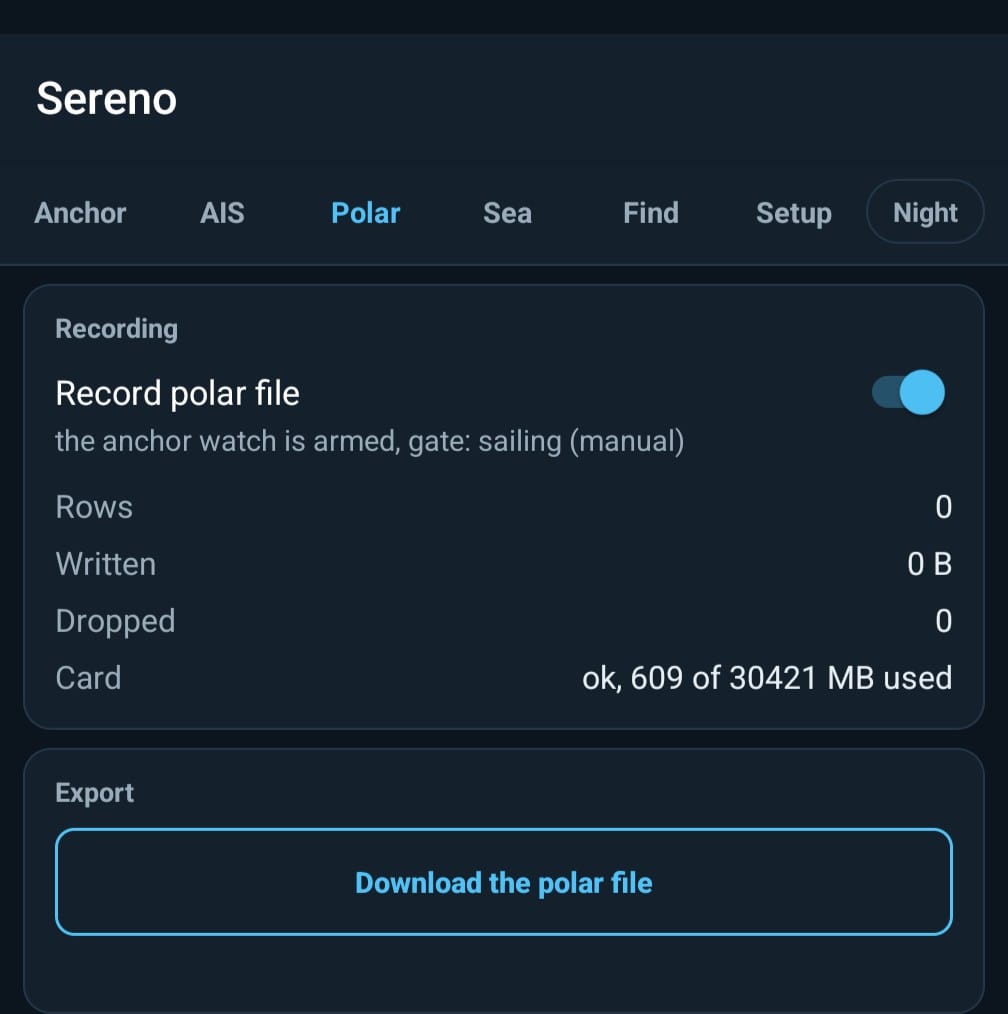
The unit records motion, position, speed, wind and engine state to its microSD card about five times a second, and you download the file from its About page. On a 65-hour passage from Fiji to Vanuatu it recorded 1.16 million rows and dropped none.
It records only while the watch isn't armed, and polars are built off the unit with separate tools to feed into Sereno Routing.
Fits what you already have
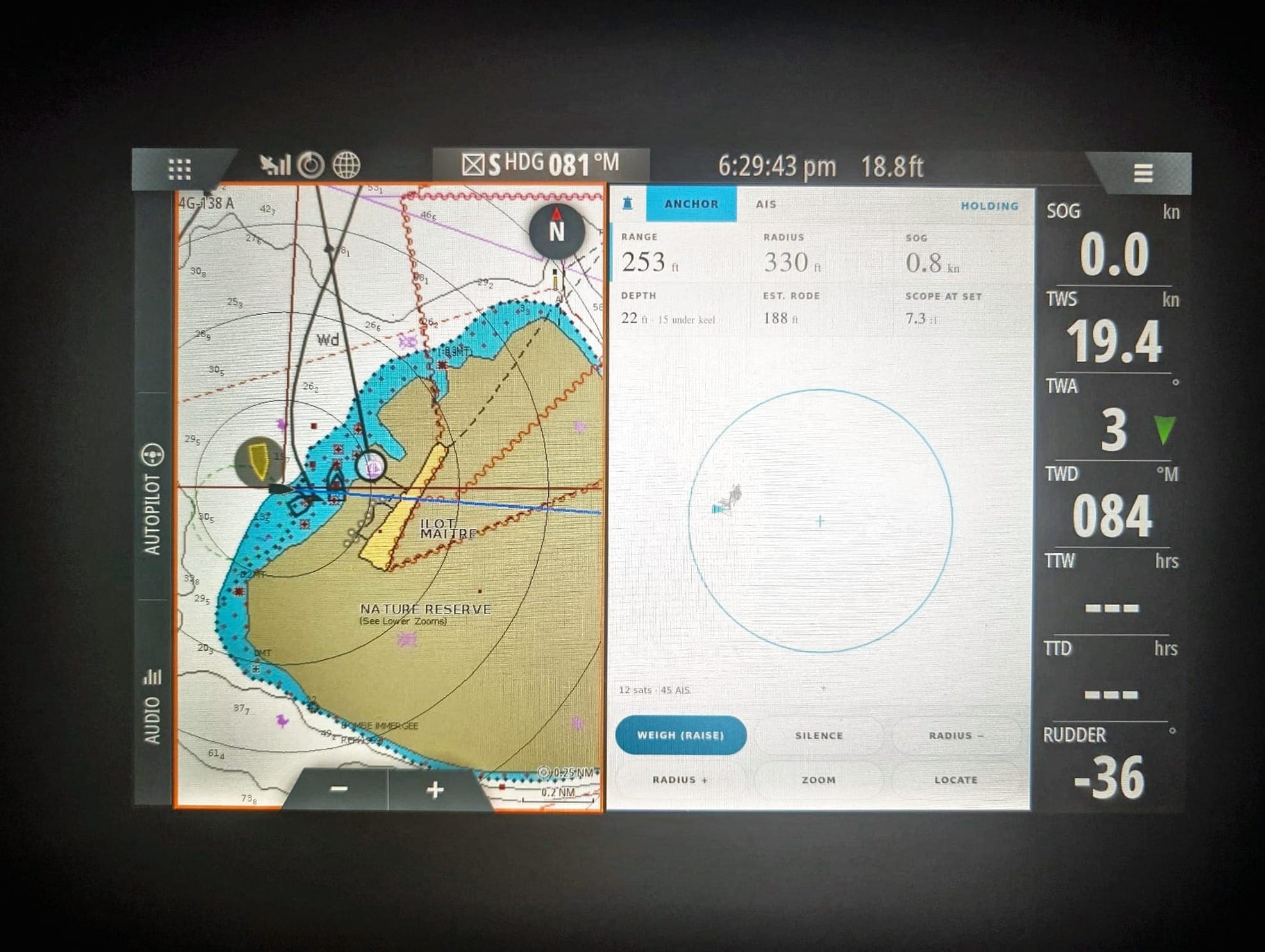
Feed it NMEA 0183 over TCP from SignalK, a wifi gateway or a multiplexer and it adds AIS, depth, wind and heading. A Sereno tile appears on Navico plotters, and it can report to Saillogger, which keeps what couldn't be sent during an internet outage. If there are GPS positions on the NMEA network it will continuously monitor all including its built-in receiver and choose the best signal.
NMEA 2000 works through a gateway that outputs 0183 over TCP. Saillogger needs its own account.
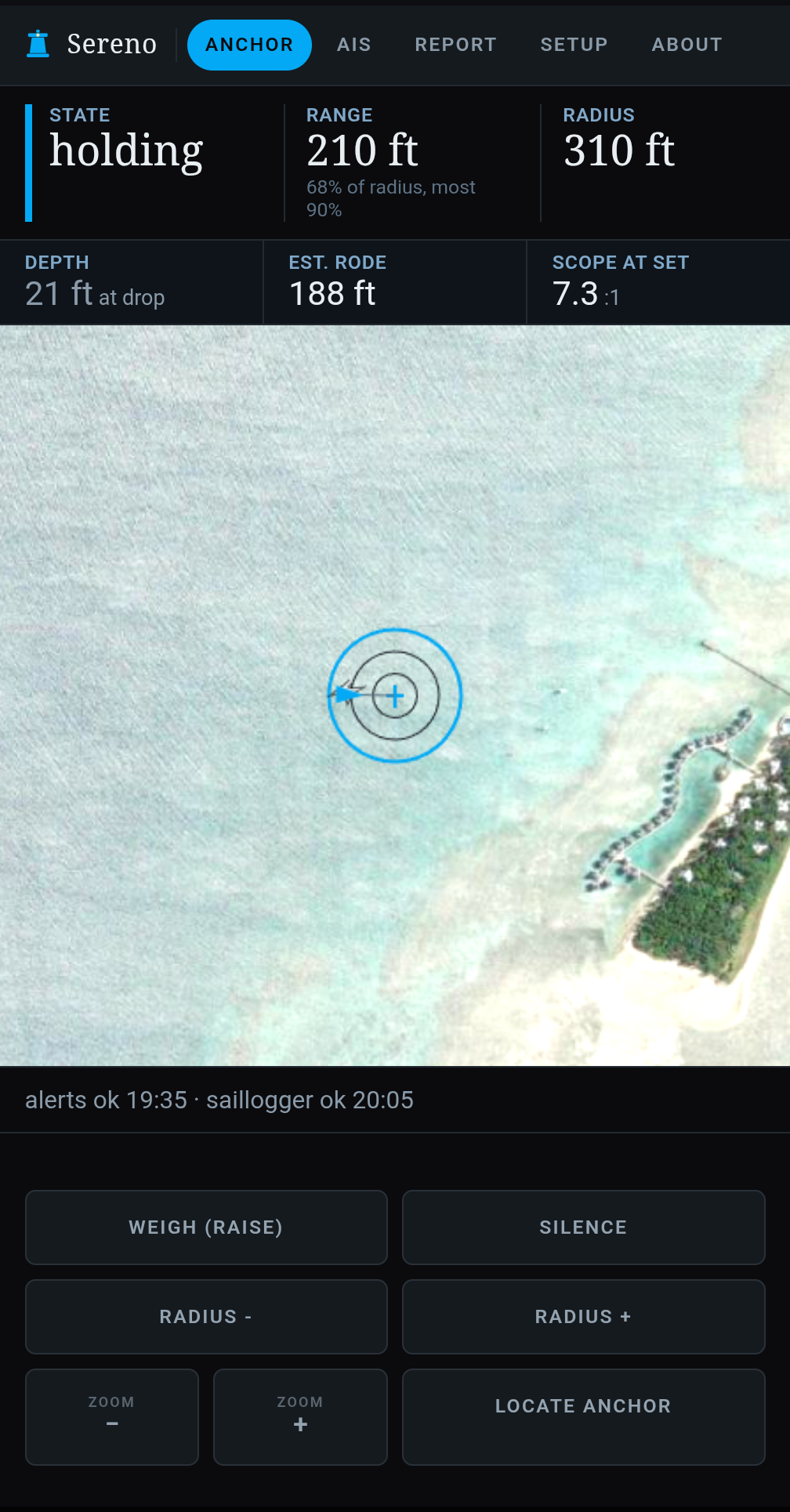
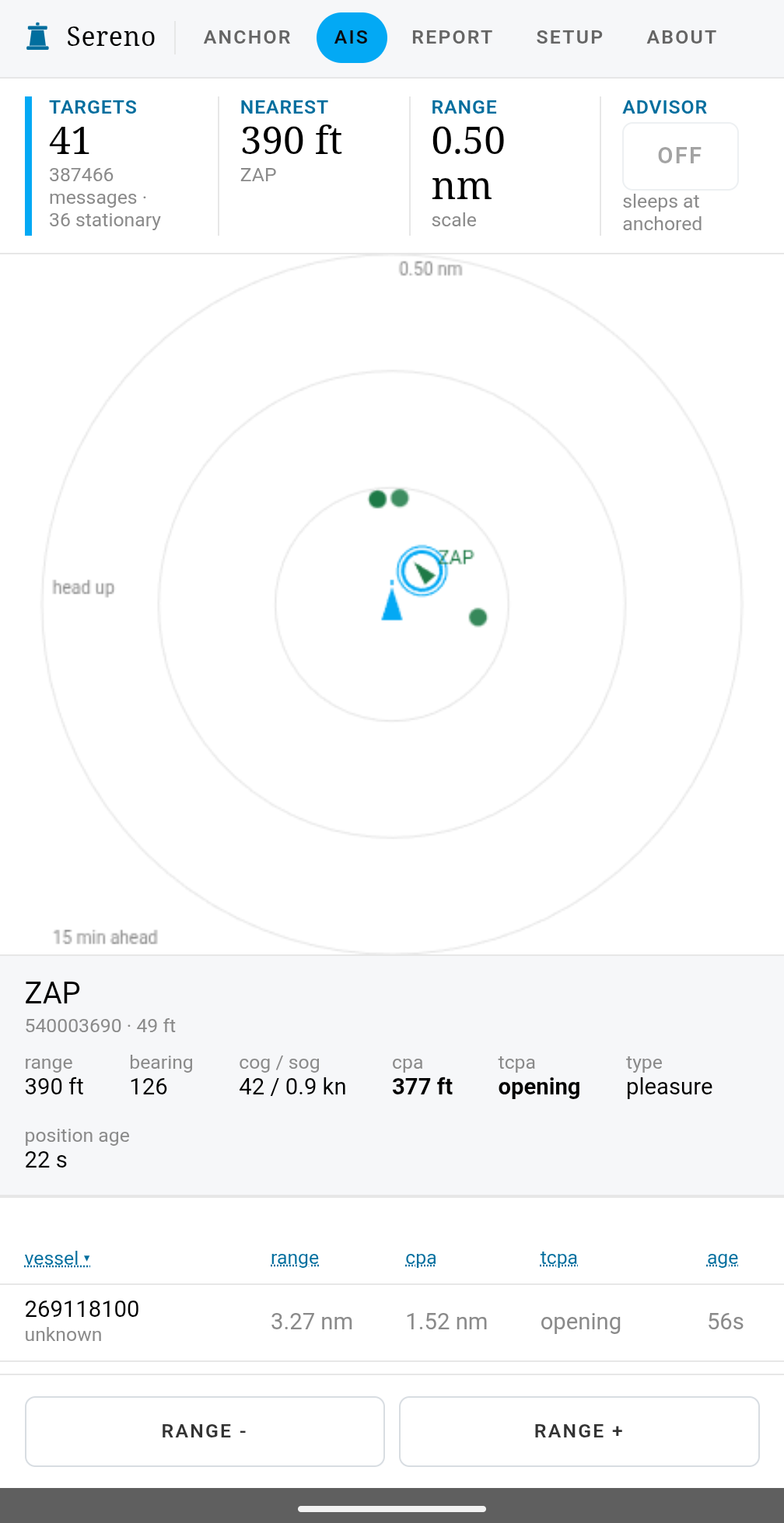
The unit
| Screen | A 2 inch touch screen shows the distance left before the alarm in large figures, with a bar that fills as you swing toward the edge. Three pads along the bottom: Drop, then Set, then Weigh; Silence; and Menu. The whole screen turns amber for a warning and red for dragging, distress or no fix. |
|---|---|
| Waking the screen | The screen goes dark after two minutes without a touch on external power. A touch on a dark screen only wakes it. It can't weigh the anchor or silence a live alarm, so a stray tap in the night does nothing. |
| GPS | A u-blox NEO-M9N receiver using GPS, GLONASS, Galileo and BeiDou together, on a 1 m external antenna. The About page shows how many satellites it uses and sees. The antenna needs sky: under a glass hatch or on the coachroof works, inside a cupboard might not. |
| Speaker | A built-in 1 watt speaker. It chirps twice at every start, which confirms it works, and the About page has a speaker health row. The unit has no wired alarm output, so sound is the speaker only. |
| Power | USB-C from a phone charger, or 9 to 24 volts DC through the base it ships in. A 24 volt bank sits above that range while it charges, so it isn't compatible with a 24 volt system on a boat. |
| Internal battery | A small 500 mAh cell. It keeps the unit up through a power cut long enough to tell your phone, and it isn't meant to run the watch overnight. We measured over 2 hours before it drained and powered down. |
| Barometer | Reads air pressure, shows the three-hour change on the About page and sends it to Saillogger. There's no pressure alarm. |
| Motion sensor | Used for passage recording. It isn't part of the alarm. |
Keeping watch
| The circle | Press Drop, back down, press Set. The circle is sized to where the boat lies plus 50 ft (about 15 m). Adjust it in 10 ft or 3 m steps, or place the anchor on the plot while the watch is unarmed. Set is refused on a position more than 10 seconds old. Rode and scope are estimates and need depth from the boat's network and the boat's geometry. |
|---|---|
| Warning ring | A band inside the circle gives a short beep before the alarm, up to half the radius wide. Wind-angle and speed-through-water warnings need wind from the network or a speed log. |
| Six states | Disarmed, Acquiring, Holding, Dragging, No fix and Distress, each with its own sound. |
| Drag detection | Outside the circle for 5 seconds is Dragging. |
| If the GPS goes wrong | If its own GPS goes quiet for 6 seconds, jumps impossibly, or rates itself worse than 20 m, the watch switches to the boat's network GPS. With no network GPS it says No fix instead of raising a false drag alarm. That only helps a unit that has a network GPS, and it doesn't protect against GPS errors in general. |
| Silence | Silence snoozes drag, distress and no-fix alarms for 10 minutes. A warning stays silenced until something worse happens. Silencing aboard doesn't silence the phone alerts, and silencing the phone doesn't silence the unit. |
| Control from the boat | Any browser on the boat's wifi can drop, set, change the radius, silence and weigh. |
| Control from ashore | None. Saillogger shows the anchor state read-only. We decided against weighing from ashore, and remote silence and radius changes aren't built. |
Alerts to your phone
| Drag, distress, no fix | Emergency priority with a siren. It repeats every 60 seconds for up to an hour until you acknowledge it, and retries for up to 8 hours if the link is down. A distress alert gives the range, bearing and MMSI. |
|---|---|
| Anchor down and up, back inside | Quiet and normal-priority notices. Back inside also covers the position feed coming back. |
| Restarted and still armed | Tells you a power cut or an update restarted the unit while it was watching. |
| Daily check | A quiet message at local solar noon, only while armed. |
| Power notices | On its battery after 60 seconds, battery low under 3.40 volts, and back on external power. Each also sounds aboard. |
| What it needs | A Pushover account (free for 30 days, then a one-time $4.99 per platform) and internet on the boat. Set your phone to let the alerts through Do Not Disturb, or they arrive silently. A lapsed Pushover license looks like a sent message to the unit. |
Network and reports
| Network feed | An optional NMEA 0183 feed over TCP from SignalK, a Vesper, a wifi gateway or a multiplexer adds AIS, depth, wind, heading and a fallback GPS. NMEA 2000 works through a gateway that outputs 0183 over TCP. We tested a Yacht Devices YDEN-02. |
|---|---|
| SignalK | Engine RPM and hours and the house battery are read from SignalK's stream for Saillogger. It needs a SignalK server. |
| Safety report tab | Tsunami, earthquake, cyclone, forecast and advisories. It needs SignalK and the separate signalk-sereno-safety-report plugin. |
| Saillogger | Telemetry every minute, AIS every 5 minutes, and the anchor state on its anchor card. It needs a Saillogger account, and it's a report, not a second alarm. |
| Outage buffer | When the internet drops, telemetry is saved to the card and sent when it returns. AIS isn't buffered. This allows you to maintain tracking details for Saillogger while offshore without internet. |
| Plotter tile | A Sereno tile appears on Navico plotters (B&G, Simrad, Lowrance), with an on and off switch. We've tested it on a B&G Zeus. |
| Web pages | Anchor, AIS and advisor, helm display, Setup, About, and a mirror of the unit's screen. The unit serves them to any phone or laptop on the boat's wifi, with no internet or app needed. |
| Satellite imagery | Optional, under the plot. Your phone fetches it, not the unit. |
Recording
| Passage recording | Press Record polar file on the About page. The unit writes motion, position, speed, wind and engine state to a CSV on its microSD card at about 5 Hz, and you download it from the About page. It records only while the watch isn't armed. Polars are built off the unit. If engine data is on the nmea network, the device won't record polars while an engine signal is showing on. |
|---|---|
| Card self-test | Writes a file, reads it back and compares. The result shows on the About page. |
The collision advisor
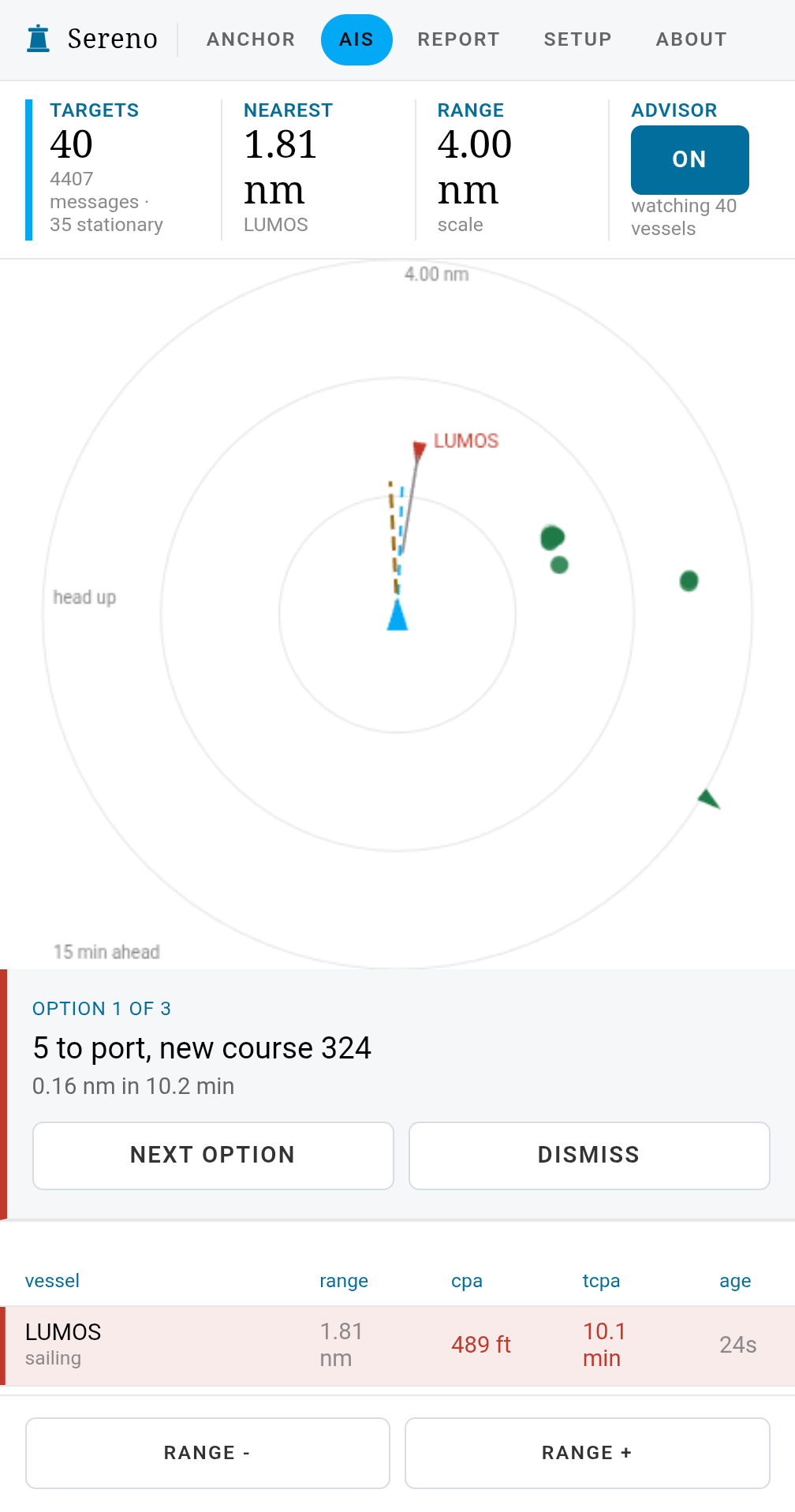
With AIS from the boat's network, Sereno One works as a collision advisor: when holding your course would bring another vessel inside the limit for your cruising profile, it suggests a change of course or speed. It needs AIS, so it only sees vessels that transmit it. Sereno is an aid to keeping watch, and the captain stays responsible for anchoring safely and keeping a proper lookout.
The advisor is active only when holding your course fails. If nothing is projected to come inside your limit, it says nothing, which is most of the time at sea. When six or more vessels are in conflict at once, it stops advising and tells you to take over on decisions. When nothing it can suggest clears every vessel, it says so and leaves the call to the skipper. This is an early release feature and should not be relied on for safe navigation.
The profile sets are currently hard coded with:
| Profile | A moving vessel is a conflict inside | Looking ahead |
|---|---|---|
| Marina | 120 m (394 ft) | 10 minutes |
| Anchored | 180 m (591 ft) | 15 minutes |
| Coastal | 152.4 m (500 ft) | 15 minutes |
| Offshore | 1 nm | 60 minutes |
Updates, and your membership
Updates install from the About page. Your browser fetches the image, so the boat needs no internet for it. The unit refuses an image built for a different board, and an armed watch asks you to confirm first. An update stops the watch until the unit restarts and gets a fix.
We publish at most one update a week unless a fix is critical. A routine release is meant to run on Sabado and our testers for five days first, including an anchor session, a passage with the advisor running and a stress test. A critical fix gets a shorter test.
Nothing in the firmware checks your membership. A Sereno One that's running keeps alarming whatever happens to your subscription. You won't lose access to a Sereno One or its updates regardless of your membership status.